Meta ad sizes in 2026: the complete cheat sheet (feed, stories, reels)
Every Meta ad size you need in one place — feed, stories, reels, carousel, and more. Save this before your next campaign setup.
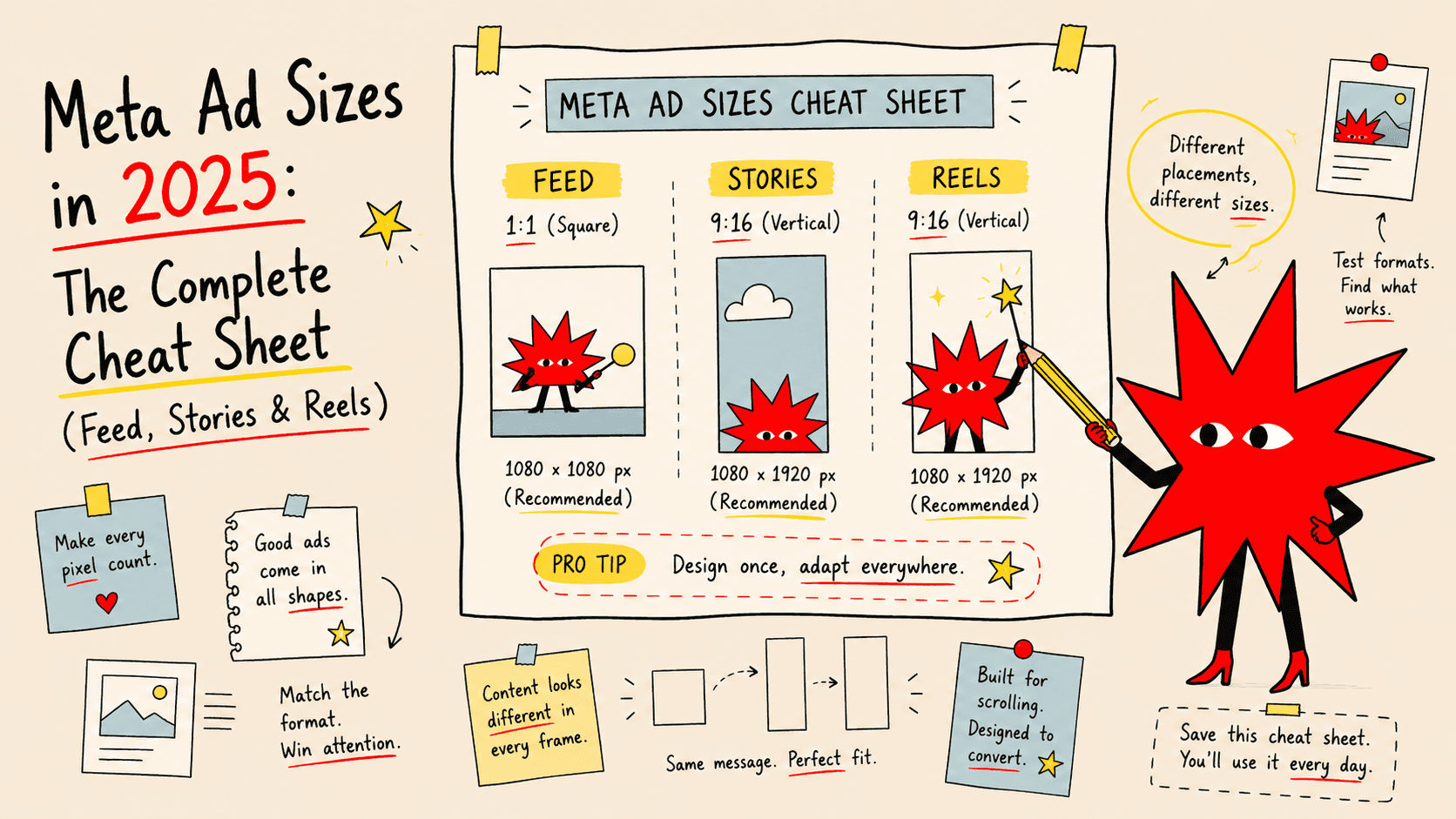
Setting up a Meta campaign and not sure which image size to use?
You're not alone. Meta has more placements than ever — feed, stories, reels, marketplace, right column, audience network — and each one has different size requirements. Get it wrong and your creative gets cropped, stretched, or rejected entirely.
This is the only reference you need. Bookmark it.
Why ad sizes matter more than most people think
Meta will technically accept an image in the wrong ratio. It'll just auto-crop it to fit the placement.
The problem is Meta crops from the center — which means your logo, your headline, or your product might get cut off entirely. You don't find out until your ad is live.
Getting the sizes right upfront means:
Your creative looks exactly how you designed it
No awkward cropping in Stories or Reels
Better performance (ads that fit their placement look more native and get higher engagement)
Meta ad sizes — full reference table (2025)
Feed ads (image)
Format | Ratio | Recommended size | Min size |
|---|---|---|---|
Square (most common) | 1:1 | 1080 × 1080 px | 600 × 600 px |
Landscape | 1.91:1 | 1200 × 628 px | 600 × 314 px |
Portrait | 4:5 | 1080 × 1350 px | 600 × 750 px |
Which to use: The 4:5 portrait (1080 × 1350 px) takes up the most screen real estate in the feed and consistently outperforms square for most advertisers. If you can only create one size for feed, make it 4:5.
Stories ads (Facebook & Instagram)
Format | Ratio | Recommended size | Safe zone |
|---|---|---|---|
Full screen vertical | 9:16 | 1080 × 1920 px | Keep key content within 1080 × 1420 px |
What the safe zone means: Meta overlays your profile name and a CTA button at the top and bottom of Stories. If your text or logo sits in those areas, it gets covered. Keep anything important in the middle 75% of the frame.
Reels ads (Facebook & Instagram)
Format | Ratio | Recommended size | Safe zone |
|---|---|---|---|
Full screen vertical | 9:16 | 1080 × 1920 px | Keep key content within 1080 × 1420 px |
Reels use the same dimensions as Stories. The difference is context — Reels are shown in a scrolling video feed, so your creative competes with native video content. Static images work, but video or motion graphics perform significantly better in Reels placements.
Carousel ads
Format | Ratio | Recommended size |
|---|---|---|
Each card | 1:1 | 1080 × 1080 px |
Carousel cards are always square. You can have 2–10 cards per carousel. Each card can have its own headline and link, or you can use them to tell a sequential story across the swipe.
Video ads
Placement | Ratio | Recommended size | Max file size | Max length |
|---|---|---|---|---|
Feed | 4:5 or 1:1 | 1080 × 1350 px or 1080 × 1080 px | 4 GB | 240 min |
Stories / Reels | 9:16 | 1080 × 1920 px | 4 GB | 60 sec (Stories) / 15 min (Reels) |
In-stream | 16:9 | 1280 × 720 px | 4 GB | 5–15 sec recommended |
For video: MP4 or MOV format, H.264 codec, minimum 30fps. Keep file size under 1 GB for faster upload and processing.
Other placements
Placement | Ratio | Recommended size |
|---|---|---|
Facebook right column | 1.91:1 | 1200 × 628 px |
Facebook Marketplace | 1:1 | 1080 × 1080 px |
Audience Network (native) | 1.91:1 or 1:1 | 1200 × 628 px or 1080 × 1080 px |
Messenger inbox | 1.91:1 | 1200 × 628 px |
Right column ads appear only on desktop. They're smaller and less prominent — not worth prioritising unless you're running a retargeting campaign specifically targeting desktop users.
The three sizes that cover 90% of campaigns
If you want to keep things simple and cover the major placements, create these three:
1. 1080 × 1350 px (4:5) — feed portrait
Your primary creative. Works on Facebook feed, Instagram feed, and can be cropped to 1:1 for carousel. The tall format takes up more of the screen and stops more scrolls.
2. 1080 × 1920 px (9:16) — stories/reels
Required for Stories and Reels placements, which are often cheaper per click than feed. Without this size, you're either skipping these placements or letting Meta auto-crop your feed creative badly.
3. 1080 × 1080 px (1:1) — square fallback
Works everywhere. Not the best performer in any single placement, but the safest option if you need one creative to run across multiple placements without cropping issues.
Text limits and file requirements
Text on image: No hard rule anymore, but keep it minimal. Heavy text reduces reach in some auction scenarios. A clean creative with one short headline outperforms a cluttered one.
File formats accepted: JPG, PNG (image) · MP4, MOV (video) · GIF (treated as video)
Image file size limit: 30 MB
Minimum resolution: 1080 px on the shortest side is the safe floor. Below that, Meta may flag the creative as low resolution.
Color space: RGB (not CMYK — that's for print)
How to produce the right sizes without doing it manually
The tedious part isn't knowing the sizes — it's actually exporting your creative in every format.
Most designers do it manually: design the feed version, then resize and recompose for Stories, adjust again for square. That's 30–45 minutes of resizing per creative set.
aussi.ai handles this automatically. You enter your product URL, upload your brand assets, and it outputs your creative across all Meta formats — feed, stories, reels — in one go. No manual resizing, no cropping guesswork.
Useful whether you're creating your first campaign or producing new creative sets every week.
Quick reference — save this
Placement | Size | Ratio |
|---|---|---|
Feed portrait (best) | 1080 × 1350 px | 4:5 |
Feed square | 1080 × 1080 px | 1:1 |
Feed landscape | 1200 × 628 px | 1.91:1 |
Stories | 1080 × 1920 px | 9:16 |
Reels | 1080 × 1920 px | 9:16 |
Carousel card | 1080 × 1080 px | 1:1 |
Right column | 1200 × 628 px | 1.91:1 |
Need your creatives in all these sizes without the manual work?
Aussi AI generates Meta ad creatives across every format from a single product URL. Try Aussi free →
Word count: ~900 words
Internal links to add: link to post #1 ("how to create Meta ad creatives") in the intro, link to post #7 ("how to test ad creatives") in the CTA section.
Image suggestions for Framer: a visual showing the three key formats side-by-side on a phone mockup (4:5 feed, 9:16 stories, 1:1 square) — this will also serve well as a Pinterest/social share image for the post.